








Troubleshooting Paper Abrasion and Blurry Images (Head Height) (iPF8300)
Solution
If the Printhead rubs against paper during printing, adjusting the Printhead height may improve results.
If image edges are blurred, it may help to lower the Printhead.
NOTE
- Raise or lower the printhead, depending on the nature of the problem.
1.On the "Tab Selection screen" of the Control Panel, press  or
or  to select the Paper tab (
 ).
).
or to select the Paper tab ().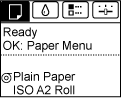
NOTE
- If the "Tab Selection screen" is not displayed, press the "Menu" button.
2.Press the "OK" button.
The "Paper Menu" is displayed.
3.Press  or
or  to select "Paper Details", and then press the "OK" button.
or to select "Paper Details", and then press the "OK" button.4.Press  or
or  to select the type of paper, and then press the "OK" button.
or to select the type of paper, and then press the "OK" button.5.Press  or
or  to select "Head Height", and then press the "OK" button.
or to select "Head Height", and then press the "OK" button.6.Press  or
or  to select the desired setting value, and then press the OK button.
or to select the desired setting value, and then press the OK button.NOTE
- Depending on the type of paper, some setting values may not be available.