








The Built-in Flash does not Fire (EOS REBEL T5/EOS 1200D)
Solution
In the following shooting modes the camera automatically determines whether to fire the built-in flash. Therefore, the flash may not fire in bright shooting conditions.
<  >: Scene Intelligent Auto
>: Scene Intelligent Auto<  >: Portrait
>: Portrait<  >: Close-up
>: Close-up<  >: Night Portrait
>: Night PortraitThe procedure for firing the built-in flash when shooting is explained below.
1. Set the camera’s power switch to <ON>.
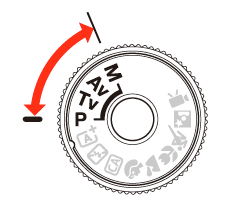
2. Set the Mode Dial to a Creative Zone mode.
3. Press the < > button.
> button.In Creative Zone modes, you can press the <> button anytime to take flash pictures.
> button anytime to take flash pictures.While the flash is recycling, " buSY" is displayed in the viewfinder, and [BUSY ] is displayed on the LCD monitor.
buSY" is displayed in the viewfinder, and [BUSY ] is displayed on the LCD monitor.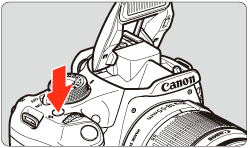
4. Press the shutter button halfway.
In the bottom left of the viewfinder, check that the < > icon is lit.
> icon is lit.
5. Press the shutter button completely to take a picture.
When focus is achieved and you press the shutter button completely, the flash will fire for the picture.
REFERENCE
The built-in flash can also be fired manually in the <  > Creative Auto Basic Zone mode. For more information, please refer to the camera’s Instruction Manual.
> Creative Auto Basic Zone mode. For more information, please refer to the camera’s Instruction Manual.