








Selecting the AF Point Manually (EOS 7D Mark II)
Solution
You can manually select the AF point or zone.
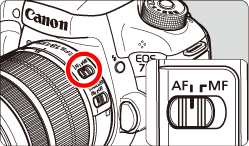
1. Set the lens’s focus mode switch to <AF>.
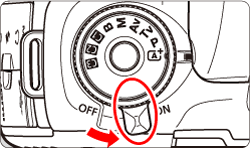
2. Set the camera's power switch to <ON>.
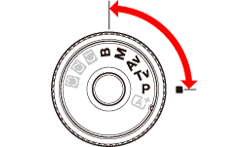
3. Set the Mode Dial to < P / Tv / Av / M / B>.
4. Press the < > button.
> button.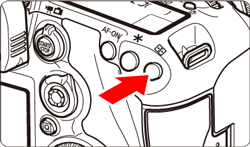
5. Select an AF point.
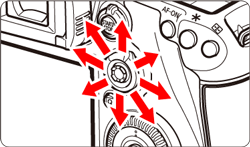
- The AF point selection will change in the direction you tilt <
 >.
>. - If you press <> straight down, the center AF point (or center zone) will be selected.
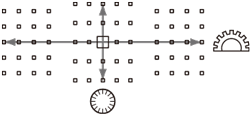
- You can also select a horizontal AF point by turning the <
 >dial and select a vertical AF point by turning the <
 > dial.
 - In the Zone AF mode, turning the <> or <> dial will change the zone in a looping sequence.
NOTE
- In the <
 > mode, the AF operation and AF area selection mode are set automatically.
 - When [
 :
:  Initial AF pt, AI Servo AF] is set to [ Initial AF pt selected], you can use this method to manually select the AI Servo’s AF starting position.
 - When you press the <> button, the LCD panel displays the following:
-65-point automatic selection AF, Zone AF, Large Zone AF:  AF
AF
AF-Single-point Spot AF, Single-point AF, and AF point expansion: SEL  (Center)/SEL AF (Off-center)
(Center)/SEL AF (Off-center)- With [
 : Manual AF pt. selec. pattern], you can set either [Stops at AF area edges] or [Continuous]