Restoring Default Camera Settings (EOS M5)
Solution
If you accidentally change a setting, you can restore default camera settings.
1. Set the camera’s power switch to <ON>.
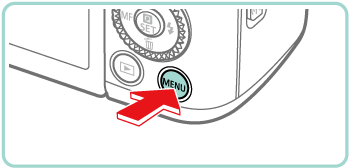
2. Press the [MENU] button.
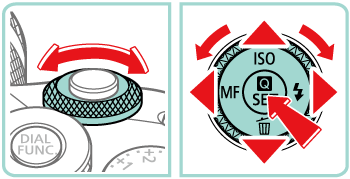
3. Press the [  ], [
], [  ] buttons or turn the [
  ] dial to select the [
  - 4 ] tab.
], [ ] buttons or turn the [ ] dial to select the [ - 4 ] tab.Press the [  ], [
], [  ] buttons or turn the [
  ] dial to choose [Reset camera] and then press the [
  ] button.
], [ ] buttons or turn the [ ] dial to choose [Reset camera] and then press the [ ] button.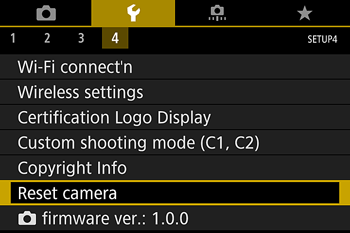
4. Press the [ ], [ ] buttons or turn the [ ] dial to choose [Basic settings], and then press the [ ] button.
], [ ] buttons or turn the [ ] dial to choose [Basic settings], and then press the [ ] button.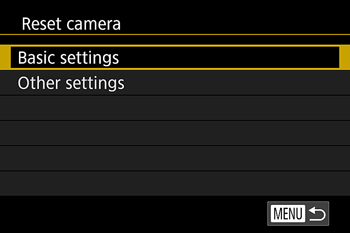
5. Press the [ ], [ ] buttons or turn the [ ] dial to choose [OK], and then press the [ ] button.
], [ ] buttons or turn the [ ] dial to choose [OK], and then press the [ ] button.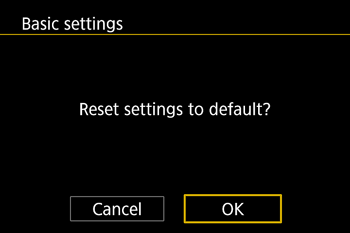
All camera defaults are now restored.
NOTE
The following functions are not restored to default settings.
- [ - 1 ] tab setting [Video system]
- [ - 2 ] tab settings [Time Zone], [Date/Time], and [Language
 ]
] - [
 - 5 ] tab settings [External flash func. setting] and [External flash C.Fn setting] in [Flash Control]
 - [
 - 1 ] Tab
 - Exposure compensation setting
- Shooting mode
- Wireless settings
- Calibrated value for the electronic level
- Copyright information
Settings for the following functions can be restored to defaults individually.
- User settings for custom shooting modes
- [ - 5 ] tab settings [Built-in flash settings], [External flash func. setting], and [External flash C.Fn setting] in [Flash Control]
- [ - 1 ] Tab
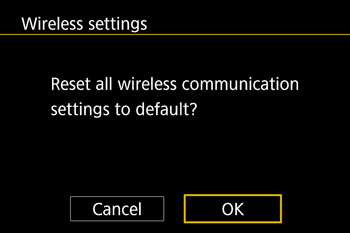
- Wireless settings
- Calibrated value for the electronic level
- Copyright information
1. Press the [MENU] button.
2. Press the [ ], [ ] buttons or turn the [ ] dial to select [ - 4 ] tab.
], [ ] buttons or turn the [ ] dial to select [ - 4 ] tab. Press the [ ], [ ] buttons or turn the [ ] dial to choose [Reset camera] and then press the [ ] button.
], [ ] buttons or turn the [ ] dial to choose [Reset camera] and then press the [ ] button.
3. Press the [ ], [ ] buttons or turn the [ ] dial to choose [Other settings], and then press the [ ] button.
], [ ] buttons or turn the [ ] dial to choose [Other settings], and then press the [ ] button.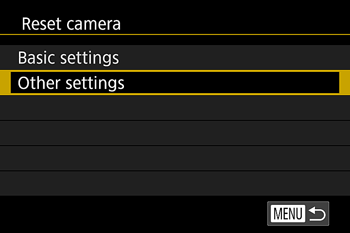
4. Press the [ ], [ ] buttons or turn the [ ] dial to choose the function to reset, and then press the [ ] button.
], [ ] buttons or turn the [ ] dial to choose the function to reset, and then press the [ ] button.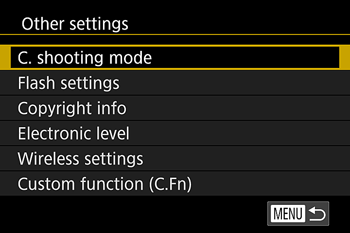

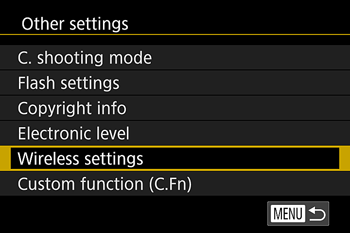
5. Press the [ ], [ ] buttons or turn the [ ] dial to choose [OK], and then press the [ ] button.
], [ ] buttons or turn the [ ] dial to choose [OK], and then press the [ ] button.- Default function settings are now restored.