





EOS R50 V Firmware Update, Version 1.2.0 [Windows]
ฉันได้อ่านและทำความเข้าใจข้อจำกัดความรับผิดชอบด้านล่าง
และต้องการดาวน์โหลดซอฟต์แวร์ที่กำหนด
ข้อมูลซอฟต์แวร์
ข้อมูลซอฟต์แวร์
ระบบปฏิบัติการ
ภาษา
รายละเอียด
Firmware Version 1.2.0 incorporates the following enhancements and fixes:
1. Adds the ability to set [AF for close-up demos] during movie recording in [Movie manual exp.], [Movie auto exposure], and other Creative Zone modes to allow for its use in combination with exposure and AF area settings.
2. Adds [Wi-Fi freq. band] to [Communication Settings], allowing the user to select the 5 GHz or 2.4 GHz band when transferring from Bluetooth to Wi-Fi.
3. Adds the ability to set [False Color Settings] to [On] when [HDR/C.Log View Assist] is selected.
4. Adds the option for grid display during movie recording.
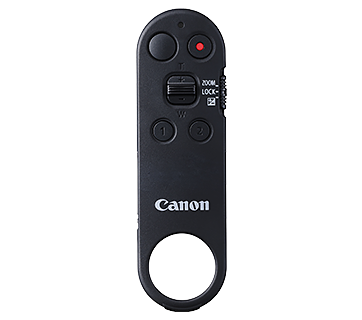
5. Adds support for the Wireless Remote Controller BR-E2.
6. Improves display settings when using the RF-S7.8mm F4 STM Dual lens and adds [3:2] and [1:1] as new selectable options for [Still img. aspect ratio].
7. Adds support for the Software Development Assistance Kit (EDSDK/CCAPI).
8. Fixes an issue that may impact the camera's ability to operate properly when shooting with the touch shutter in an extremely dark environment.
9. Fixes an issue that may cause the camera to not be recognized when connected to a smartphone via USB.
10. Improves other system stability.
If the camera's firmware is already Version 1.2.0, it is not necessary to update the firmware.
Please perform the firmware update with only the firmware file to be updated stored on the memory card.
Notes:
Users manual in the WEB is updated accordingly. Please download the manual as well as the latest firmware. You can download it from the official WEB site.
Preparations for a firmware update:
After the downloaded compressed file (.zip) is extracted, a firmware folder is created.
*Extracting the downloaded file:
Right-click the zip file, and then select Extract All to extract the file.
In the folder you downloaded are the firmware (R50V1200.FIR / file size: 76,908,272 bytes) and instructions on the firmware update procedures (a PDF file in five languages: Japanese, English, French, Spanish, and Simplified Chinese). Before starting the firmware update operations, please be sure to carefully review the instructions to confirm your understanding of the firmware update procedures.
(The following is the history of past firmware updates.)
Changes in version 1.1.0:
1. Improves security features. A password must be set initially.
•Adds the ability to review the history of any changes made to the password, network information, or other settings.
*For more information, please refer to the 'Setting a Password' section in the Advanced User Guide on cam.start.canon.
2. Enables firmware updates to be performed when the camera is connected to the internet and new firmware is made available on Canon servers.
3. Fixes an issue in which Err70 may occur during Bluetooth communication due to interference from other Bluetooth devices.
4. Fixes an issue in which Err70 may occur when repeatedly shooting in the "High-speed continuous shooting +" mode.
5. Fixed an issue where frame rates (119.9P [NTSC] and 100.0P [PAL]) and bit rates that should not have been selectable were incorrectly displayed in the [Streaming size] settings screen during live streaming via HDMI connection.
ข้อมูลไฟล์
- ชื่อไฟล์: eosr50v-v120-win.zip
- เวอร์ชันไฟล์: 1.2.0
- ประเภทไฟล์: zip
- ภาษาของไฟล์: EN,ZH,ES,FR,JA
- ขนาดไฟล์: 75.81 MB
ข้อจำกัดความรับผิดชอบ
ซอฟต์แวร์ โปรแกรม (รวมถึงแต่ไม่จำกัดเพียงไดรเวอร์) ไฟล์ เอกสาร คู่มือ คำแนะนำ หรือเนื้อหาอื่นใด (รวมเรียกว่า "เนื้อหา") ทั้งหมดที่มีอยู่ในเว็บไซต์นี้อยู่บนพื้นฐาน "ตามสภาพที่เป็นอยู่
บริษัท แคนนอน มาร์เก็ตติ้ง (ไทยแลนด์) จำกัด และบริษัทในเครือ ("แคนนอน") ขอสงวนสิทธิ์ไม่รับประกันใดๆ เกี่ยวกับเนื้อหาและขอปฏิเสธการรับประกันทั้งหมดโดยชัดแจ้งหรือโดยนัย (รวมถึงแต่ไม่จำกัดเพียงการรับประกันโดยนัยของความสามารถในการซื้อขาย ความเหมาะสมสำหรับวัตถุประสงค์เฉพาะและการไม่ละเมิด ) และไม่รับผิดชอบต่อการปรับปรุง การแก้ไข หรือการสนับสนุนเนื้อหา
แคนนอนของสงวนสิทธิ์ ในชื่อ ความเป็นเจ้าของ และสิทธิ์ในทรัพย์สินทางปัญญาที่เกี่ยวข้องทั้งหมดในเนื้อหา คุณสามารถดาวน์โหลดและใช้เนื้อหาเฉพาะเพื่อวัตถุประสงค์ส่วนตัวที่มิได้เป็นการใช้งานเชิงพาณิชภายใต้ความเสี่ยงของคุณเอง แคนนอนจะไม่รับผิดชอบต่อความเสียหายใดก็ตามที่เกี่ยวข้องกับเนื้อหา (รวมถึงแต่ไม่จำกัดเพียงค่าเสียหายทางอ้อม ค่าเสียหายที่เป็นผลสืบเนื่อง ค่าเสียหายเพื่อเป็นเยี่ยงอย่างหรือค่าเสียหายที่ไม่ได้เกิดขึ้นทันที หรือไม่ได้คาดหมายไว้แต่ต้น)
คุณไม่ได้รับอนุญาตให้ทำการแจกจ่าย มอบหมาย อนุญาต ขาย ให้เช่า ออกอากาศ ส่ง เผยแพร่ หรือโอนเนื้อหาไปยังบุคคลอื่น นอกจากนี้คุณจะต้องไม่ (และไม่อนุญาตให้ผู้อื่น) ทำการผลิตซ้ำ ดัดแปลง เปลี่ยนรูปแบบ ถอดประกอบ ถอดรหัส หรือทำวิศวกรรมย้อนกลับ หรือสร้างงานลอกเลียนแบบจากเนื้อหาทั้งหมดหรือบางส่วน
คุณตกลงที่จะไม่ส่งหรือนำเนื้อหาจากประเทศ / ภูมิภาคที่คุณได้รับไปยังประเทศ / ภูมิภาคอื่น ๆ โดยไม่ได้รับอนุญาตจากรัฐบาลที่เกี่ยวข้อง (ในกรณีที่กฎหมายกำหนดให้ต้องทำเช่นนั้น) และ / หรือการละเมิดกฎหมาย ข้อจำกัด หรือข้อบังคับใด ๆ
ในการดาวน์โหลดเนื้อหา คุณตกลงที่จะผูกพันตามกฎหมายและระเบียบข้อบังคับทั้งหมดข้างต้นที่บังคับใช้ที่เกี่ยวข้องกับการดาวน์โหลดและการใช้เนื้อหาของคุณ