




Linking an application to MP Navigator EX (Macintosh)
สารละลาย
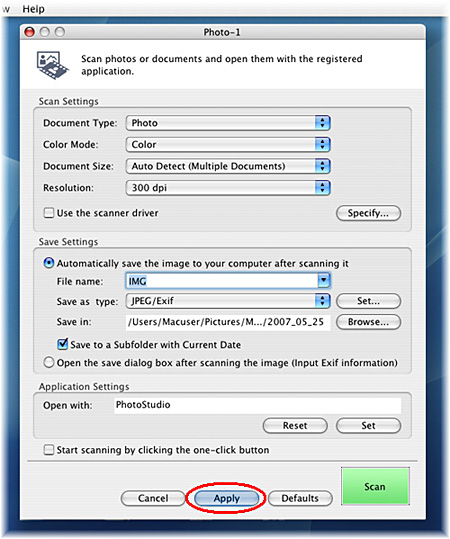
In this example, "ArcSoft PhotoStudio" will be registered to [Photo-1].
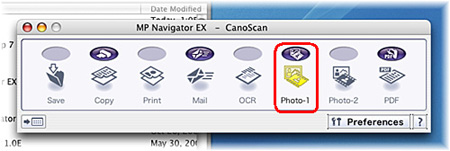
The name of currently registered application is displayed in [Application Settings].
If no application is registered, "Drag and drop an application icon here to register" is displayed in [Application Settings].
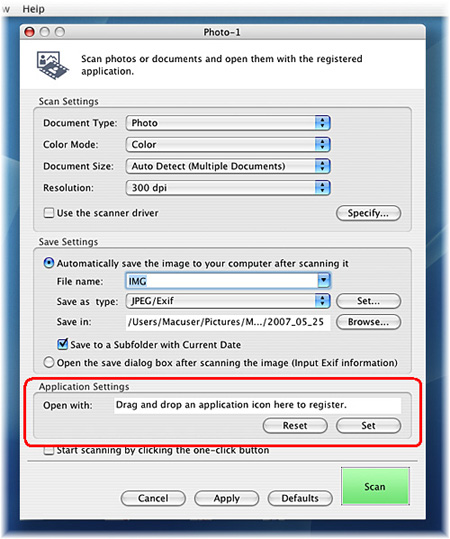
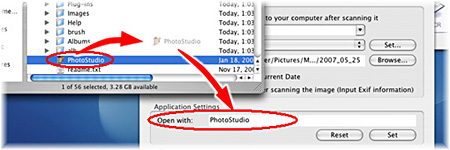
Drag and drop the ArcSoft PhotoStudio (or an application you want to register) icon or alias to [Application Settings] ("Drag and drop an application icon here to register", if no application is registered).
After the application is registered, its name will be displayed in [Open with:].
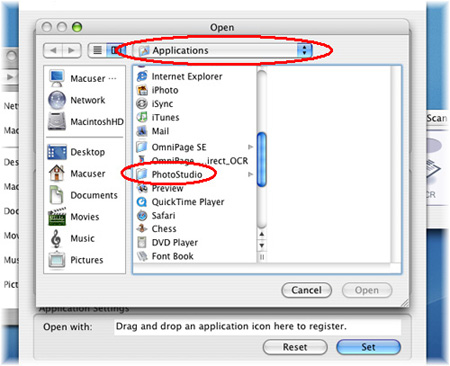
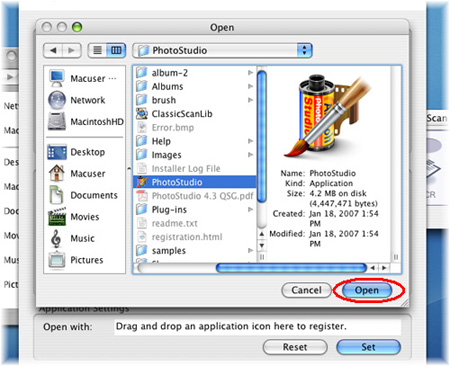
4. If you cannot locate the "ArcSoft PhotoStudio" (or an application you want to register) icon or alias,
Click the [Set] button in [Application Settings] to display [Open] screen.

5. Normally the executable file is in the folder with its name or the manufacturer's name in the [Applications] folder.
Since file extension names are not appended by Macintosh systems, search icons for the executable file. (Folders may also be displayed as icons.)
Select the executable file and click [Open].
6. After the application is registered, its name will be displayed in [Application Settings] on the [Photo-1] dialog box.