








Correcting the Green Tint from Mercury Lamps
สารละลาย
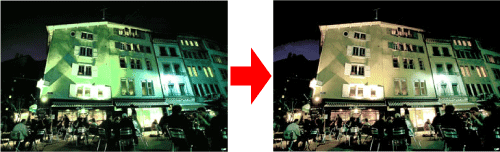
When shooting scenes lit by mercury lamps, such as night scenes, the subject and background in the recorded image may have a green tint. You can automatically correct the green tint when shooting (Multi-area White Balance).
IMPORTANT
- To make the settings for [Hg Lamp Corr.], it is necessary for the shooting mode to be set to [AUTO] (
 ).
).
1. Press the <Power> button on the camera.
2. Touch [FUNC.] ( ), and then touch [MENU] (
 ).
).
), and then touch [MENU] ().3. The following screen appears.
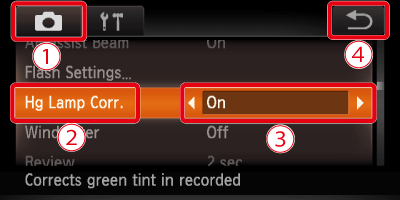
 Touch the [Shooting] (
 ) tab.
  Drag up or down the screen to choose [Hg Lamp Corr.].
 Touch (
 ) or (
 ) to choose [On].
 Touching (
 ) restores the settings screen.
4. Once set, ( ) will appear on the screen.
) will appear on the screen.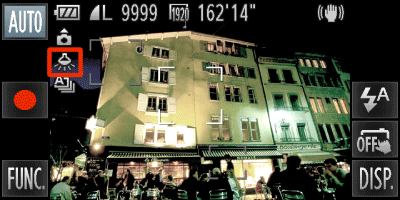
If () does not appear, press the < > button a few times to get it to appear.
) does not appear, press the <> button a few times to get it to appear.NOTE
- After shooting scenes lit by mercury lamps, you should set [Hg Lamp Corr.] to [Off]. If left set to [On], naturally occurring green colors (not from the effects of a mercury lamp) may be accidentally corrected.
- Movies cannot be corrected.
- Since you may not achieve the expected results depending on the shooting conditions, try taking some test shots first.