








[Protected] is displayed and images cannot be erased (PowerShot SX400 IS / PowerShot SX520 HS)
สารละลาย
Protected images cannot be erased using the camera’s erasure function. To erase them this way, first cancel protection.
IMPORTANT
- The position and shape of the operation buttons, screens displayed, and setting items may differ according to the model you use.
1. Press the camera's < > button to turn it on.
> button to turn it on.2. Press the <MENU> button.
3. On the [Playback] ( ) tab, press the <
 ><
>< > buttons to choose [Protect], and then press the <
 > button.
) tab, press the <><> buttons to choose [Protect], and then press the <> button.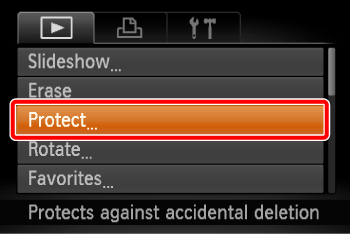
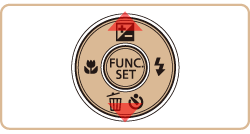
4. Press the <><> buttons to choose [Unprotect All Images], and then press the <> button.
><> buttons to choose [Unprotect All Images], and then press the <> button.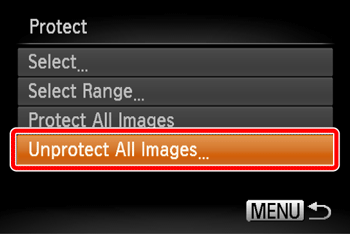
5. Press the < ><
>< > buttons to choose [OK], and then press the <> button.
><> buttons to choose [OK], and then press the <> button.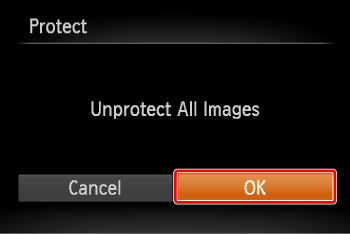
All protected images will be unlocked.
1. Press the camera's <> button to turn it on.
> button to turn it on.2. Press the <><> buttons to choose the protected image you want to unlock. (The [  ] icon appears on protected images.)
><> buttons to choose the protected image you want to unlock. (The [ ] icon appears on protected images.)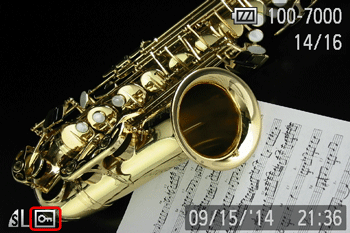
3. Press the <> button.
> button.4. Press the <><> buttons to choose [  ], and then press the <> button.
><> buttons to choose [ ], and then press the <> button.
5. The [ ] icon will disappear and the image will be unlocked.
] icon will disappear and the image will be unlocked.- To unlock other images, repeat steps 2-4.
IMPORTANT
- Be careful when erasing images, because they cannot be recovered.
1. Press the camera's <> button to turn it on.
> button to turn it on.2. Press the <><> buttons to select the image you want to erase.
><> buttons to select the image you want to erase.3. Press the < > button.
> button.4. Press the <><|G0099807||3]]> buttons, choose [ Erase], and then press the <> button.
><|G0099807||3]]> buttons, choose [ Erase], and then press the <> button.
- To cancel erasure, press the <><> buttons to choose [Cancel], and then press the <> button.
5. The current image is now erased.