








Checking the Amount of the Toner Remaining
สารละลาย
1. Display the Printer Status Window.
For details on methods for displaying the Printer Status Window, see [Displaying the Printer Status Window].
2. Click [  ] (Consumables/Counters).
] (Consumables/Counters).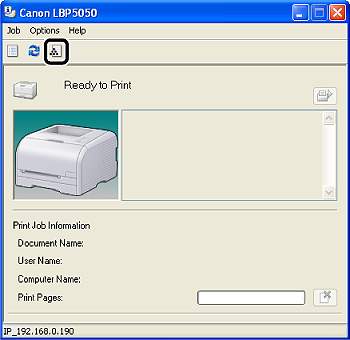
In the [Consumables/Counters] dialog box, status bars and messages that indicate life of toner cartridges of each color are displayed.
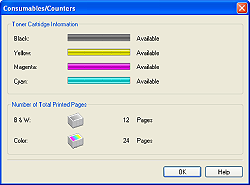
The definitions of the status bars and messages are as follows.
| Status Bar | Message | Meaning |
 | <Available> | Continue using as normal. |
 | <Replacement Needed Soon> | The toner cartridge is nearing the end of its life. Have ready a replacement toner cartridge. |
 | <Check Cartridge> | Because there is a possibility that a toner cartridge whose print quality cannot be guaranteed or a used toner cartridge that has reached its lifetime is installed, it is recommended that you replace the toner cartridge. |
| <Replace Cartridge> | The toner cartridge has reached the end of its life. Replace the toner cartridge. |
 | <Insert Cartridge> | One or more toner cartridges are not installed or are not installed in the appropriate position. |