





Import/Export Function (MF4380dn/MF4370dn Only)
สารละลาย
The Remote UI enables you to save the Address Book data in your computer or load address book into the machine from saved files. The Import/Export function is intended for data exchange, and is available only through the Remote UI.
To use the Import/Export function, start the Remote UI on the web browser.
CAUTION
The Import/Export operation may take more than a few minutes to complete. Do not turn the machine's main power OFF until the operation is complete. Otherwise, the machine may malfunction.
NOTE
- Do not operate the machine while importing or exporting an address book.
- If the machine is in the Sleep mode, press [Energy Saver] on the operation panel to cancel the Sleep mode before performing an Import operation.
- During an Export operation, the screen display does not change until the operation is complete. Do not click [Start Export] while the hourglass or pointer indicates that the operation is still being processed.
- [Import/Export] is displayed only when you are in the Administrator Mode.
- The actual computer screens may vary from sample ones depending on the model connected to your computer.
You can store the Address Book as a file in your computer.
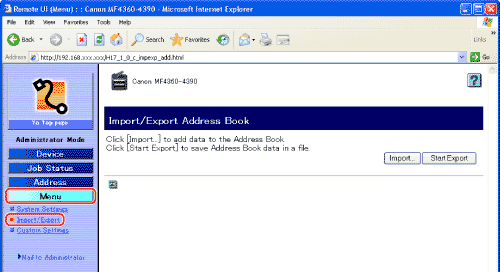
1. Click [Menu] -> select [Import/Export] from the menu that appears under [Menu].
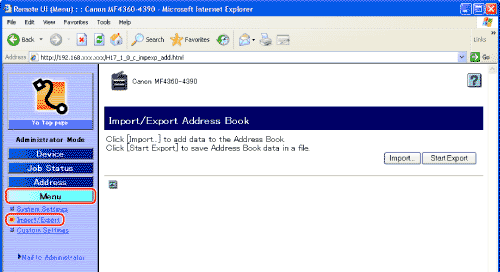
2. Click [Start Export].
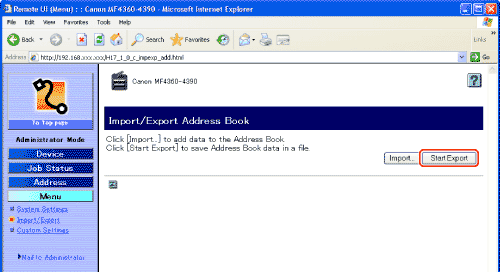
3. Follow the instructions on the screen to specify the location where you want to save the file.
The file is saved in the specified location.
You can load address books into the machine from saved files.
NOTE
- If the machine is in the Sleep mode, press [Energy Saver] on the operation panel to cancel the Sleep mode before performing an Import operation.
- When you register the contents of a new file, the currently registered addresses are overwritten by the new address list.
- You can register up to 108 addresses in the Address Book. Each address is treated as a separate item.
- You cannot import the group dialing information which contains another group dialing.
1. Click [Menu] -> select [Import/Export] from the menu that appears under [Menu].
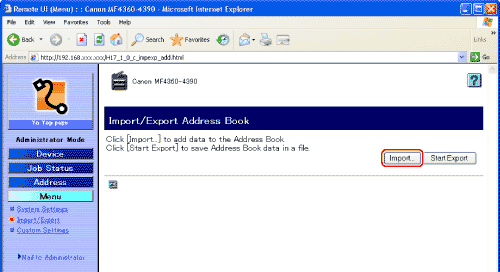
2. Click [Import].
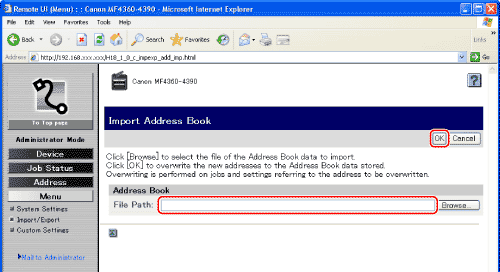
3. Click [Browse] -> select the file to import -> click [OK].
NOTE
- Do not execute any other jobs while importing an address book.
- If you are using Safari, click [Choose File] instead of [Browse] to select the file of the Address Book data to import.