





The Main Dial, Quick Control Dial, Multi-controller, and AF area selection lever settings cannot be changed (EOS 5DS / EOS 5DS R)
สารละลาย
It will not be possible to operate the Main Dial, Quick Control Dial, Multi-controller, and AF area selection lever if [  : Multi function lock] is set and the [
  ] switch has been moved to the right.
: Multi function lock] is set and the [ ] switch has been moved to the right.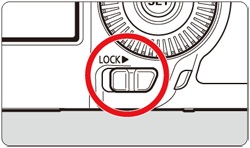
[ ] switch set to the right: Lock engaged
] switch set to the right: Lock engaged [ ] switch set to the left: Lock released
] switch set to the left: Lock releasedNOTE
- If the [ ] switch is set to the right and you try to use one of the locked camera controls, [L] will be displayed in the viewfinder and on the LCD panel. On the shooting settings display, [LOCK] will be displayed.
- By default, when locked, the [
 ] dial will be locked.
Set the [ ] switch to the left to release the lock.
] switch to the left to release the lock.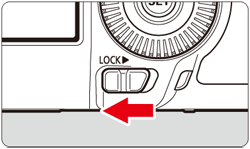
1. Set the camera's power switch to [ON].
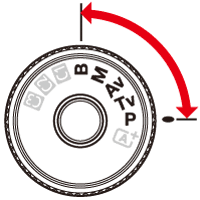
2. Set the Mode Dial to [ P / Tv / Av / M / B].
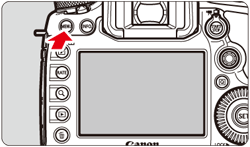
3. Press the [MENU] button to display the menu screen.
4. Press the [  ] button and select the [
  ] tab.
] button and select the [ ] tab.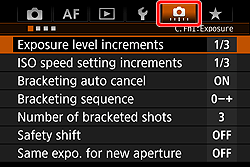
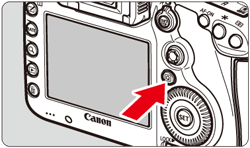
5. Turn the [  ] dial to select the [
  ] tab.
] dial to select the [ ] tab. 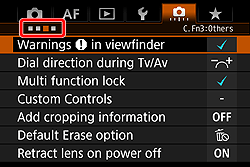
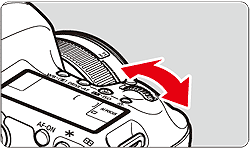
6. Turn the [ ] dial to select [Multi function lock], then press [  ].
].
] dial to select [Multi function lock], then press [ ].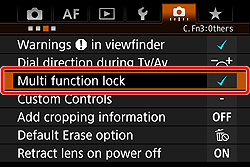
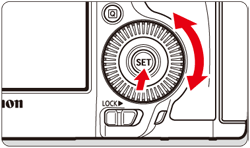
7. Turn the [ ] dial to select the camera control you want to lock, then press [ ] to append a checkmark [  ].
].
] dial to select the camera control you want to lock, then press [ ] to append a checkmark [ ].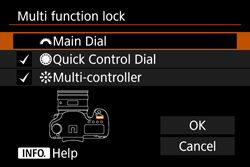
8. Turn the [ ] dial to select [OK], then press [ ].
] dial to select [OK], then press [ ].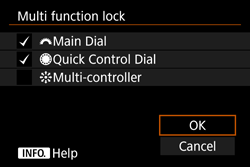
NOTE
Even if the [ ] dial is appended with a [ ] checkmark, you can still use the touch pad [  ].
].
] dial is appended with a [ ] checkmark, you can still use the touch pad [ ].